
kubectl是重要的kubernetes管理/运维工具
kubectl功能非常强大,常见的命令使用方式可以参考kubectl--help,或者这篇文章
这篇文章首先会简单介绍几个kubectl你可能不知道的小技巧,主要篇幅介绍kubectl的plugin.
kubectl小技巧设置自动补全kubectlcompletionzsh
检查资源SPEC(有没有遇到过想看SPEC只能去查API文档或者翻代码的情况?)kubectlexplain[--recursive]
给常用的命令设置alias,比如笔者常用的:kns="kubectl-nkube-system",kna="kubectl--all-namespaces=true,kcc="kubectlconfiguse-context,kgy="kubectlget-oyaml",或者直接使用这个项目生成的alias,这个项目使用一套规则生成了800多个aliases
kubectlplguinkubectl支持一种简单的plugin机制,支持通过kubectl调用另一个二进制,完成kubernetes相关的一些功能(其实对二进制执行的功能没有任何限制)
目前这种机制并没有在kubectl和plugin传递任何信息,只对plugin有两点要求
plugin为可执行文件
plugin可执行文件的名字为kubectl-$plugin_name
krew本地安装方式很简单,只需要把可执行文件移动到比如/usr/local/bin,并且命名为kubectl-$plugin_name即可。但是做好到插件如何分享,以及如何获取别人安装到插件呢。kubectl提供了一个krew(他本身也是一个插件)工具提供了相应到功能
AvailableCommands:helpHelpaboutanycommandinfoShowinformationaboutakubectlplugininstallInstallkubectlpluginslistListinstalledkubectlpluginssearchDiscoverkubectlpluginsuninstallUninstallpluginsupdateUpdatethelocalcopyofthepluginindexupgradeUpgradeinstalledpluginstonewerversionsversionShowkrewversionanddiagnostics检索插件
可以使用命令kubectlkrewsearch,但是这上面到介绍比较简介,更好到方式是到这个index页面查看介绍和去对应的github仓库查看详细介绍。
➜kubectlkrewsearchNAMEDESCRIPTIONINSTALLEDaccess-matrixShowanRBACaccessmatrixforsrsaSysdigcapturetotroubleshoottherno安装插件
使用kubectlkrewinstall
➜:custom-colsInstalledplugin:custom-cols\|Usethisplugin:|kubectlcustom-cols|Documentation:||Caveats:|\||Thelistoftemplatesisfornowlimitedandcanberetrievedwiththe--helpoption.||PleasefeelfreetosubmitanyPRupstream(seegithubrepo)toaddmore.|//WARNING:(base)推荐插件介绍change-ns
切换ns,用于切换namespace,切换后会设置在kubeconfig中,后续的操作就不用再加--namespaces了。不过设置了namespace之后需要注意的是后续的命令默认namespace都是这个设置值了,如果你在yaml中没有写名namespace,资源可能不会创建到你期望的default目录下面了.
➜kubectlchange-nskube-systemnamespacechangedto"kube-system"cssh
ssh到kubernetesnode上面去,会自动从node信息中提取外网ip,并连接tmux尝试做ssh登陆.
kubectlcssh--helpAllowsuserstoSSHintoKubernetesnodesbyopeninganewtmuxpaneforeachmatchingnodeOptions:-a,--address-type='ExternalIP':Nodeaddresstypetoqueryfor(/ExternalIP)-i,--identity-file='':Selectsafilefromwhichtheidentity(privatekey)forpublickeyauthenticationisread-l,--selector='':Selector(labelquery)tofilteron,supports'=','==',and'!='.(-lkey1=value1,key2=value2)-p,--port='':SSHport-u,--username='':SSHUsernamekubectlcssh--username=ubuntu
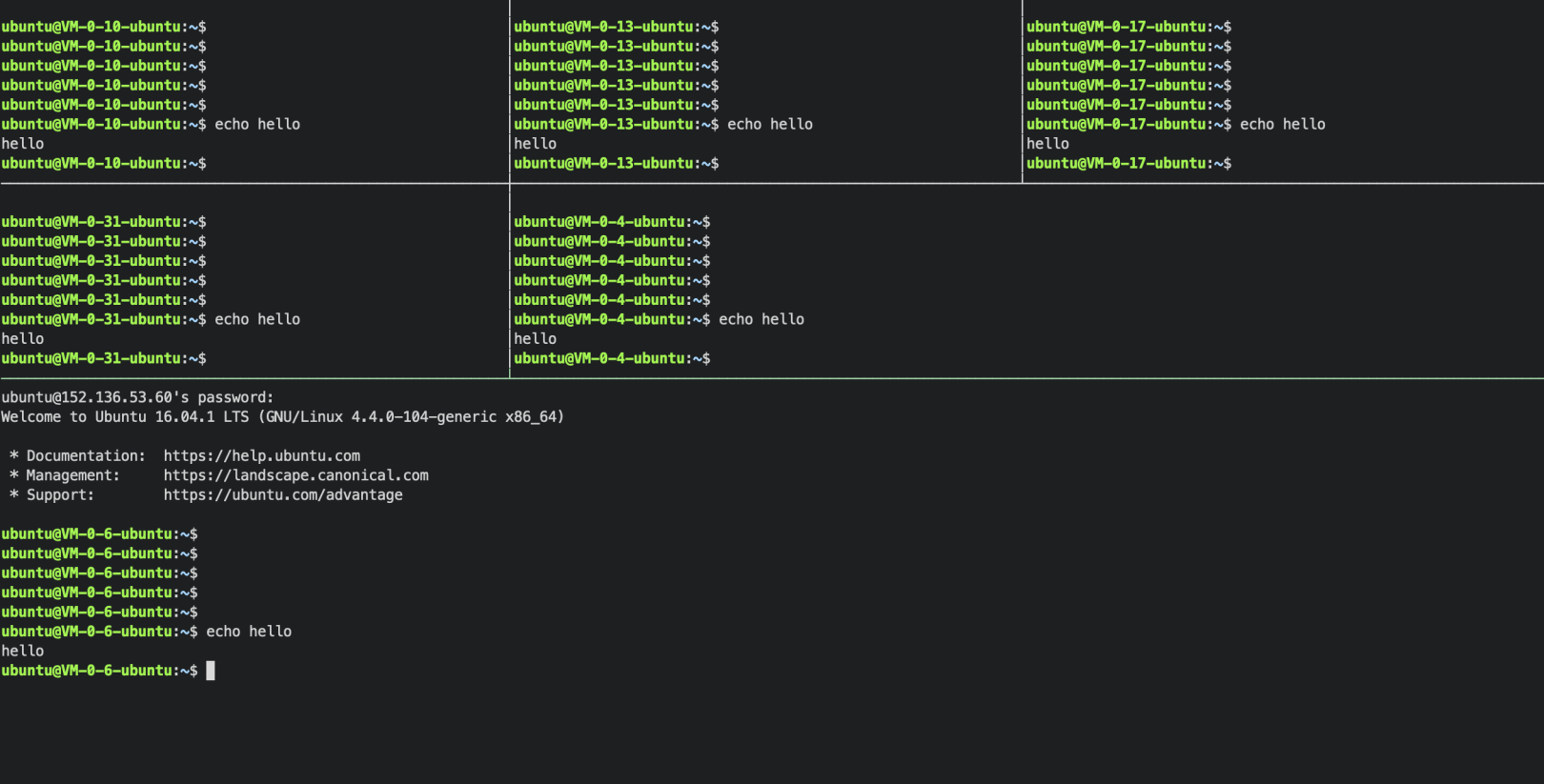
image
debug/spy两个插件的作用差不多,目的都是进去container的命名空间进行debug,不同到是debug依赖一个EphemeralContainersfeature,而spy不依赖
➜kubectlspykube-dns-d5876cbfd-r8kh4loadingspypodIfyoudon'tseeacommandprompt,trypressingenter./10053--server=//127.0.0.1这个工具并没有在krewindex发布,所以用goget安装/sysdiglabs/kubectl-dig/cmd/kubectl-digwarp
是kubectlrun+sshd-rsync命令的合成,可以方便在在pod中执行一个本地文件.
ofreplicasare0)orphandeployments(desirednumberofreplicasarebiggerthan0buttheavailablereplicasare0)
leftoverdeployments(desirednumberofreplicasandtheavailableexecinallgroups➜kubectlclustersallgetpod[GROUP]:test--------------------------------------------------------------------------------[CLUSTER]:cls-test1--------------------------------------------------[DEBUG]kubectl--context=cls-test1--namespace=defaultgetpodNAMEREADYSTATUSRESTARTSAGEnginx-6dc5bfc797-vwdz71/1Running032d[GROUP]:prod--------------------------------------------------------------------------------[CLUSTER]:cls-prod--------------------------------------------------[DEBUG]kubectl--context=cls-qcvhpqoggetpodNAMEREADYSTATUSRESTARTSAGEa4cgfxv7srbfhbsn-78479b5cf7-f85d82/2Running037d#execinsinglegroup➜kubectlclustersprodgetpod[GROUP]:prod--------------------------------------------------------------------------------[CLUSTER]:cls-prod--------------------------------------------------[DEBUG]kubectl--context=cls-qcvhpqoggetpodNAMEREADYSTATUSRESTARTSAGEa4cgfxv7srbfhbsn-78479b5cf7-f85d82/2Running037d
提交到krewindex目录
参考Boostingyourkubectlproductivity
KubectlPlugins
TheTop19KubectlPluginsOpenSourceProjects
GithubTopic-kubectl-plugins
kubectl-plugins-index